
Sesame Street Art Maker
Sesame WorkshopArt & Design
4.04.00 Reviews
- Version
- 1.6
- Installs
- 10.00K
- Age Rating
- Everyone
Screenshots
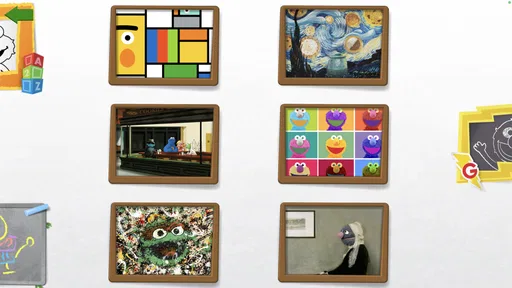
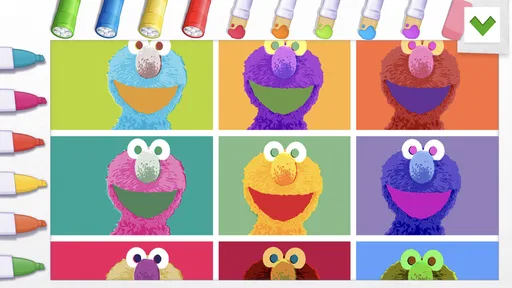
Our Review of Sesame Street Art Maker
 Analysis by Appyee
I look at Sesame Street Art Maker as a small, character-led art studio for children rather than a general-purpose drawing program. That distinction matters: its appeal comes from making creative play feel familiar, with Sesame Street characters as part of the activity. I’d consider it for a child who likes coloring and arranging pictures, or for a parent hoping to turn a quiet stretch of the day into something hands-on. I would not expect it to replace a full drawing app or an open-ended art class.
It is an Art & Design app from Sesame Workshop, aimed at an Everyone audience. The app costs $3.99, so it makes sense to think about how often your family would use a focused creative activity before buying it. Its average rating is 4.0 from 49 ratings, with 4 written reviews, and it has passed 10K+ installs. Those figures suggest a modest, established audience rather than a huge all-purpose art community; they are useful context, but not a substitute for deciding whether this particular style suits your child.
What the Creative Experience Is Best At
For a child who already recognizes Sesame Street’s world, familiar characters can make the first step into an art activity less intimidating. Instead of facing a blank page and having to invent a subject, a young artist can begin with a character, a coloring page, or a sticker and then make choices around it. I see that guided starting point as the app’s clearest strength: it lowers the barrier to getting started without taking away every opportunity to make something personal.
A practical way to use it is to offer a small prompt before handing over the device: make a picture for someone in the family, choose colors for a favorite character, or add details to a scene. That gives the activity a purpose and encourages a child to make decisions rather than simply tap through decorations. It also creates a natural stopping point; when the picture feels finished, you can look at it together instead of letting screen time drift on without a plan.
A Good Fit for Short, Shared Art Sessions
I’d especially consider it for a preschool or early-elementary child who enjoys recognizable characters, simple creative choices, and the satisfaction of completing a picture. A parent can sit beside the child, ask why they chose a color, or invite them to explain what is happening in the scene. That kind of conversation is a more realistic educational benefit than treating the app as a lesson that will teach art skills on its own.
It can also work well when a child wants to make something while an adult is nearby but occupied with a simple task. The key is to set expectations: this is digital art play, not a substitute for drawing on paper, moving around, or spending time with another person. I’d use it as one option in a mix of activities, especially if the child tends to enjoy screen-based creative play more when an adult helps frame it.
For a family visit or a quiet afternoon, a useful workflow is to let the child create first and talk about the result afterward. Asking them to describe the picture gives the activity an expressive element that a touchscreen cannot provide by itself. If they want to make another one, changing the prompt—perhaps a different mood or setting—can help avoid repeating the same sticker arrangement each time.
How It Compares with Broader Drawing Apps
Compared with a general drawing app, this one is a more guided choice. A broad art program may offer a larger canvas, more control, or tools aimed at older children and adults, but those options can also make a young beginner unsure where to start. Sesame Street’s character-centered approach trades some open-ended flexibility for familiarity and a clearer invitation to play.
Compared with paper, crayons, and coloring books, the app is easier to reset and lets a child combine drawing and character decorations in one place. Paper still has advantages: children can work without a screen, feel the materials, and keep a physical picture on the fridge. I would choose the app when convenience and familiar digital play are useful, and paper when the goal is a tactile activity, less device time, or a keepsake that can be held.
It is also not the best match for a child who wants to learn detailed illustration techniques or for a family looking for a broad collection of unrelated art projects. Its identity is closely tied to Sesame Street, which is a benefit for fans but a limit for anyone who wants a neutral canvas or a wider range of themes. Before paying, I’d ask whether the characters themselves are likely to sustain the child’s interest.
Small Choices That Make the Activity More Useful
One non-obvious tip is to treat stickers as composition pieces rather than rewards to place everywhere. Invite the child to choose one main character, then decide where the character belongs and what else the picture needs. This turns moving, resizing, or rotating decorations into a simple exercise in planning and visual balance, without making the session feel like formal instruction.
Another useful approach is to separate coloring time from free drawing time. A child who feels unsure can begin with a prepared page; after finishing, they can add their own marks or details. A child who prefers inventing can start with drawing and use a character sticker only at the end. Switching the order can make the same set of tools feel less repetitive and gives you a quick way to see which kind of creative prompt the child responds to.
Saving a picture can give a child a sense of completion, but I’d make that step part of a conversation about what they want to keep. A small collection of selected creations can be more meaningful than saving every attempt. If sharing is available in the child’s use of the app, I’d keep an adult involved and treat it as a family exchange rather than assuming that a sharing option automatically makes every destination or audience appropriate.
The purchase decision is another practical point. At $3.99, it is a paid app, not something I’d recommend buying on the assumption that every child will enjoy it. A Sesame Street fan who regularly chooses coloring and sticker activities is a stronger candidate than a child who quickly loses interest in character-based play. If your child already has a favorite free drawing tool and enjoys making pictures without familiar characters, that existing option may be enough.
Current Version and What to Expect
The app was released on March 8, 2021, and its current version is 1.6. That gives a buyer a concrete sense of its timeline and present version, but a version number alone does not tell me what changed between releases. I would not infer new tools, a redesigned interface, or ongoing feature additions from the number itself. For someone already using it, the sensible approach is to judge the current experience on its own merits rather than assume a particular update history.
For a new user, the practical question is whether the current app fits the device and the child’s needs. It requires Android 9 or later, so checking the device’s operating system before purchase is a straightforward way to avoid an unnecessary mismatch. I’d also have an adult open the app first, get familiar with how a child begins and finishes a picture, and decide how the device will be used during the activity. That brief setup can make the first session smoother without relying on a child to work out every step alone.
For existing users, a change in version can be worth noticing, but I would focus on what the child actually experiences: whether the app remains comfortable to navigate, whether favorite creative activities are still easy to find, and whether saved work is handled in a way the family is happy with. Those are more useful checks than expecting a version label to guarantee a major change. If the app is still serving its purpose, there is no need to turn each use into a search for something new.
Where I’d Set Expectations
The strongest reason to choose this app is the combination of Sesame Street familiarity and accessible art-making. Its weaker side is the same focus: children who are not drawn to the characters may find the experience less compelling, and older or more ambitious young artists may soon want more control than a character-centered activity provides. I’d skip it if you specifically need a professional-style drawing workspace, a wide range of unrelated creative themes, or an activity that keeps a child entirely away from screens.
I would also avoid treating a digital gallery or sharing as a replacement for family attention. A saved image can help a child revisit a creation, but the meaningful part often comes from asking what they made and listening to the answer. That is particularly true for younger users, who may need help deciding what to do next or may benefit from an adult guiding the session toward a manageable stopping point.
Questions about suitability are best answered by matching the app to a real routine. If your child likes Sesame Street and you want a compact activity for a calm period at home, it could be a welcome option. If you need a dependable distraction for a long stretch without adult involvement, I would be more cautious: any creative app can lose its appeal once a child has explored its familiar choices, and a parent’s small prompts can make a meaningful difference.
What should you watch as you decide whether to keep using it? Notice whether the child moves beyond placing characters and begins making choices about color, position, or the story in the picture. Notice, too, whether they can start an activity without frustration and finish feeling proud of what they made. Those everyday signs tell you more about the app’s value to your family than its rating alone.
My Take for Families
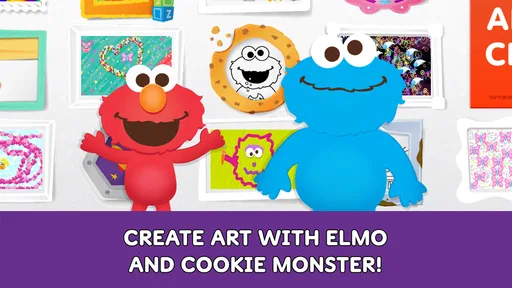
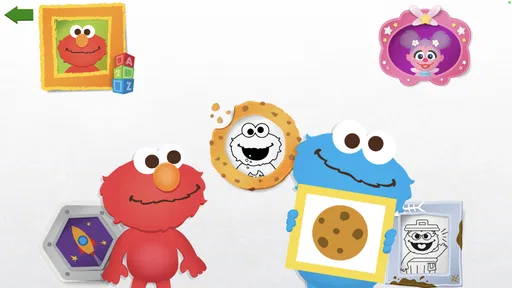
When you first open Sesame Street Art Maker, you're greeted with a warm, welcoming vibe that only the folks at Sesame Street can deliver. The layout is super intuitive, which means even the youngest users will find it easy to navigate. It’s packed with familiar faces like Elmo, Big Bird, and Cookie Monster, ready to guide you through endless creative possibilities.
The app’s design is bright and engaging, with a simple interface that encourages exploration. You don’t need to be a tech wizard to figure things out, which is perfect for both kids and parents who might be a bit technology-averse.
Features that Spark Joy
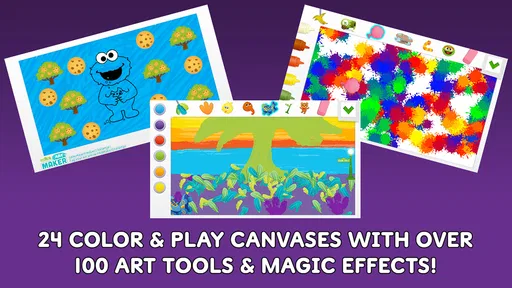
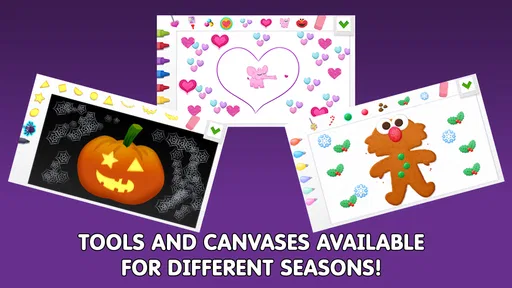
Let’s talk features! The app is loaded with digital coloring pages, stickers, and drawing tools. The coloring pages range from classic Sesame Street scenes to more abstract designs, allowing for both structured and free-form creative expression.
One of the coolest features is the sticker tool. You can add your favorite characters and decorate your masterpiece as you like. The stickers are easy to move around, resize, and rotate, giving you the flexibility to create something truly unique.
The drawing tools are equally impressive. You’ve got a rainbow of colors to choose from, along with different brush sizes and styles. Whether you want to scribble or create intricate designs, the app has you covered.
Interactive and Educational
What sets this app apart is its educational value. It’s not just about creating art; it’s also about learning. The app includes prompts and tips from your favorite Sesame Street characters, encouraging kids to think creatively and critically.
There’s also a feature that lets kids save their artwork in a digital gallery, which is a fantastic way to track progress and encourage a sense of accomplishment. Plus, they can share their creations with family and friends, fostering a supportive and interactive community.
Perfect for All Ages
While the app is primarily designed for kids, adults will find it equally engaging. It’s a wonderful way to relax and unwind. Imagine sitting down with your child or even on your own, coloring away the stresses of the day while reminiscing about those classic Sesame Street moments.
For parents, it’s a double win. You get to introduce your kids to the beloved characters you grew up with, and they get to learn and create in a safe, educational environment. It’s a bonding experience that’s both fun and meaningful.
A Warm Recommendation, with a Few Caveats
If you’re on the hunt for an app that combines creativity, education, and a hefty dose of nostalgia, Sesame Street Art Maker is a must-download. It’s user-friendly, engaging, and offers plenty of room for playful experimentation.
Whether you’re keeping the kids entertained on a rainy day or looking for a creative outlet yourself, this app can deliver. I’d choose it for a young Sesame Street fan who enjoys coloring and decorating, and look elsewhere for a child who wants advanced drawing tools or a broader art program. Used as one thoughtful activity among offline play and other creative options, it has a clear place in a family’s routine.
Verdict
Strengths of Sesame Street Art Maker
- Engaging and educational for kids.
- Easy-to-use interface for young users.
- Variety of art tools available.
- Encourages creativity and learning.
- No in-app purchases or ads.
Limitations of Sesame Street Art Maker
- Limited content for older kids.
- Requires internet for some features.
- Art creations can't be shared easily.
- No parental control settings.
- Lacks advanced customization options.
Other Releases by Sesame Workshop
View All
Sesame Street Alphabet Kitchen
Educational3.8
Similar Picks in This Category
View All
Canva: AI Photo & Video Editor
Canva4.8

PENUP – Drawing-sharing SNS
Samsung Electronics Co., Ltd.4.5

Crafto
Kutumb App4.6

Sketchbook
Sketchbook4.1

ibis Paint X
ibis inc.4.5

Adobe Express: AI Photo, Video
Adobe4.6
Frequently Asked Questions
What is Sesame Street Art Maker?
Sesame Street Art Maker is an interactive app designed for children to explore their creativity through art. It provides various tools and features like digital crayons, stickers, and backgrounds that allow kids to create their own masterpieces. The app is themed around the beloved characters from Sesame Street, making it both educational and entertaining.
Is Sesame Street Art Maker suitable for all ages?
Sesame Street Art Maker is primarily designed for preschool-aged children, typically between 2 to 5 years old. The intuitive interface and familiar characters make it easy for young users to engage with the app. However, older children may also enjoy the creative aspects, although they might find the tools a bit simplistic.
Does Sesame Street Art Maker require an internet connection?
No, Sesame Street Art Maker does not require an internet connection for use. Once downloaded, all features are available offline, allowing children to enjoy creating art anytime and anywhere. However, an internet connection may be needed for initial app updates or downloading additional content.
Are there in-app purchases in Sesame Street Art Maker?
Sesame Street Art Maker has some in-app purchases that offer additional content like extra stickers or backgrounds. These purchases are optional and not necessary for the core experience of the app. Parental controls can be enabled to manage or restrict these purchases, ensuring a safe environment for children.
How does Sesame Street Art Maker support child development?
Sesame Street Art Maker supports child development by enhancing creativity, fine motor skills, and cognitive abilities. Through interactive play, children learn about colors, shapes, and patterns while expressing themselves artistically. The app also incorporates educational elements from Sesame Street, promoting learning in a fun and engaging way.
